Gods Level Editor
A downloadable tool
A level editor for the DOS version of Gods (The Bitmap Brothers, 1992). It edits everything a level is made of: tiles, walls and ladders, objects, triggers, puzzles, monsters, switches, doors, trapdoors, moving blocks, teleports, messages and hints.
The whole editor is one file, gods_editor.html. It runs in the browser,
needs no installation and sends nothing anywhere.
Created by DarkSoL · Discord: darksol41
What you need
- The game. The DOS release of Gods, unpacked into a folder. The editor
looks for
PLEV1A.MAP,PALFILS.0A1,PBITS1A.PI1and their siblings. The game is not included. - A browser. Chrome or Edge is recommended: there the editor saves straight into the game folder. Firefox and Safari work too, but they download the changed files and you copy them into the folder yourself.
- DOSBox (or a real DOS machine) to play the result.
Quick start
- Open
gods_editor.htmlin the browser. - Press Open game folder and pick the folder with the game. Allow the browser to edit files when it asks.
- Choose a map in the list at the top. Each of the four levels has two maps: A is played first, B replaces it part-way through.
- Edit.
- Press Save level (or
Ctrl+S). Two files are written, for examplePLEV1A.MAPandPALFILS.0A1. - Start the game.
The first time a map is saved, the untouched originals are copied to a folder
named EDITOR_BACKUP inside the game folder. To undo everything, copy them
back. Keeping your own copy of the game folder as well costs nothing.
The screen
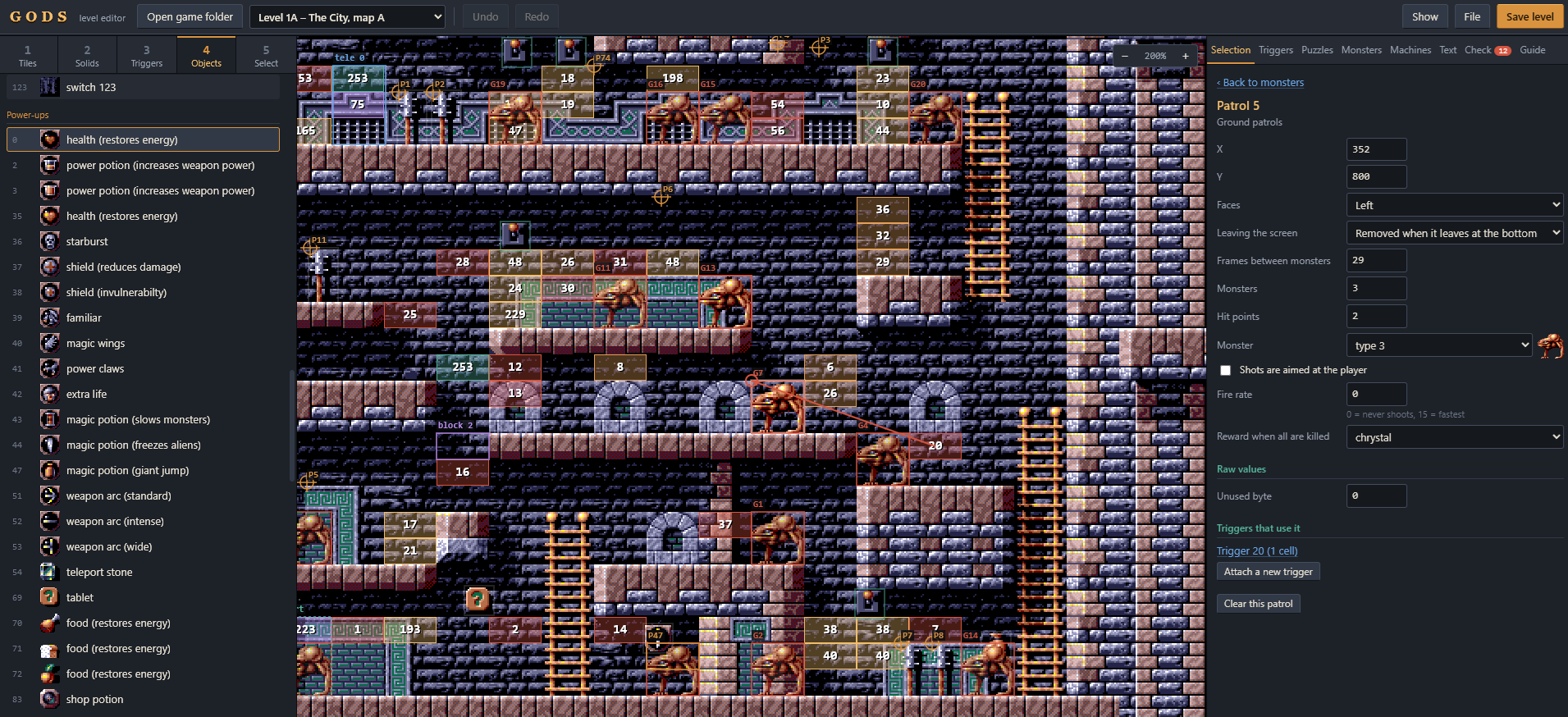
Left – tools
| Key | Tool | What it does |
|---|---|---|
1 |
Tiles | Paint the picture of the level. Drag over the palette to pick a block of tiles; Palette size switches between 1× and 2×. |
2 |
Solids | Paint walls and ladders. The picture and the collision of a cell are independent. |
3 |
Triggers | Paint trigger cells: the places where something happens. |
4 |
Objects | Place items, weapons, keys, levers and scenery. |
5 |
Select | Click anything to inspect it; drag objects, spawn points and puzzle targets to move them. |
Middle – the map. Coloured outlines mark monster spawn points, puzzle targets, trapdoors, blocks and teleport destinations. When something is selected, arrows show what it is connected to. The Show menu turns the overlays on and off.
Right – everything else
| Tab | Contents |
|---|---|
| Selection | The thing you clicked, with all its settings and links to related records |
| Triggers | All 253 triggers |
| Puzzles | All 100 puzzles, each described in a plain sentence |
| Monsters | Ground patrols, flying waves, walker gangs, flyer gangs |
| Machines | Switches, trapdoors, moving blocks, teleports |
| Text | Status-bar messages and hint texts |
| Check | Inconsistencies the game would handle badly; click one to jump to it |
| Guide | A short reference, always at hand |
How a Gods level works
Every cell of the map has a picture and a collision value. The collision value is empty, wall, ladder, or a trigger number.
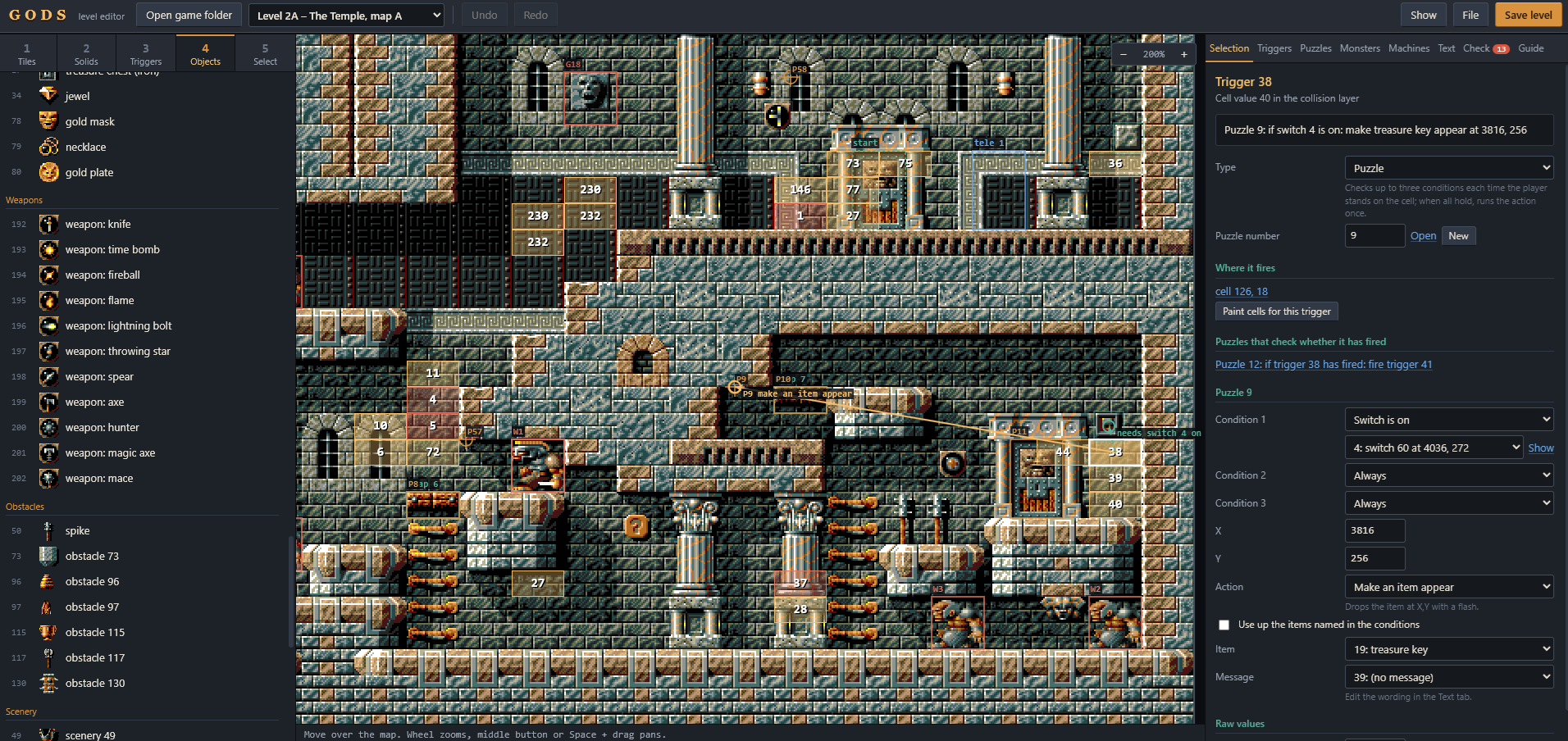
When the player's body overlaps a trigger cell, the game runs the trigger with that number. A trigger is a type and a target:
| Type | Effect |
|---|---|
| Flying wave | launches a formation that follows a recorded flight path |
| Ground patrol | spawns walking monsters at a fixed position |
| Puzzle | checks a puzzle (see below) |
| Walker gang | spawns smarter walking monsters that can steal items |
| Flyer gang | spawns smarter flying monsters |
| Checkpoint | sets the restart point and counts progress |
| Move block | runs one of a moving block's four commands |
| Start the guardian | begins the boss fight |
Each trigger works once. A puzzle trigger stays armed until the puzzle's conditions hold.
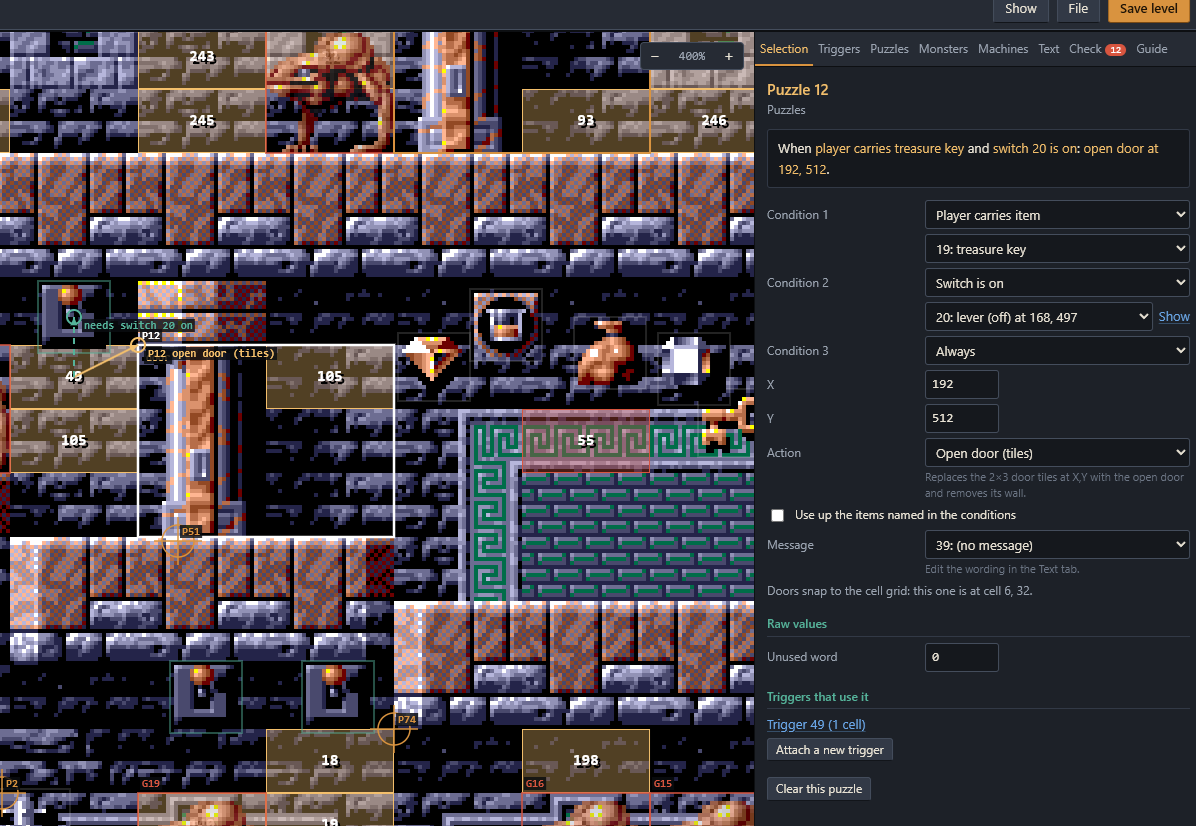
A puzzle has up to three conditions, one action, a position and a message. While the player stands on a cell of its trigger, the conditions are tested every frame. When all of them hold, the message appears in the status bar and the action runs.
- Conditions: carries / does not carry an item, has / does not have a weapon, a switch is on / off, another trigger has / has not fired, energy, lives, score, time since the timer was reset.
- Actions: make an item or weapon appear, open or close a door, open or close a trapdoor, open a passage door to another place, open the level exit, destroy an obstacle, take a weapon away, restart the timer, fire another trigger.
"Fire another trigger" is how events are chained: one puzzle can release monsters, start a block or check a second puzzle. A trigger does not need any cells if a puzzle fires it.
Recipes
Something happens when the player walks here
- Puzzles tab → New.
- Pick the action (for example Make an item appear) and its parameter. Leave the conditions on Always, or set up to three.
- Drag the
P…marker on the map to where the action should take place. - Press Attach a new trigger at the bottom of the form.
- Paint the trigger cells where the player will walk. The body is three cells tall, so paint at body height, not in the floor.
A lever that opens a door
- Tiles: put the level's door tile in the top-left cell of the doorway (the Tiles panel names the tile number). The game turns it into a closed door, 2 cells wide and 3 tall, when the level starts.
- Objects: place a
lever (off)on the wall. - Select the lever → New puzzle for this switch.
- In the puzzle choose Open door (tiles) and drag its marker onto the door.
- Paint the trigger cells under the lever. The puzzle is only checked while the player stands on those cells.
A door that needs a key
Place a key (door key, treasure key …), create a puzzle with the condition Player carries item → that key and the action Open door (tiles), and paint its trigger cells in front of the door. The key is used up.
Monsters that appear when the player arrives
Monsters tab → choose the kind → New → set type, number, hit points and reward → Attach a new trigger → paint the cells.
A door to somewhere else
Puzzle action Open passage door. The position is where the doorway appears; the parameter is the destination cell, anywhere on the map.
The end of the level
Puzzle action Open level exit. Entering that door ends the level.
How the player uses things
Worth knowing when you place trigger cells:
- Power-ups, treasure and weapons are taken by walking over them. Treasure placed in the air falls to the floor.
- Keys and other inventory items: crouch and press fire.
- Levers: push up to face the wall, then press fire.
- Passage doors and the exit: push up inside the doorway.
Limits
| Map size | 128 × 64 cells (32 × 16 px each) | Objects | 200 |
| Triggers | 253 (two are reserved) | Puzzles | 100 |
| Ground patrols | 100 | Flying waves | 100 |
| Walker gangs | 50 | Flyer gangs | 50 |
| Switches | 64 | Trapdoors | 20 |
| Moving blocks | 25 | Teleports | 30 |
| Messages | 40 | Hints | 40 |
Things to know before you build
- Checkpoints end worlds. Trigger 253 (cell value 255) is the checkpoint.
Besides setting the restart point, every new checkpoint adds one to a
counter, and when the counter reaches a number fixed inside
GAME.EXEthe "world completed" screen appears. Level 1, for example, ends world one at the third checkpoint. The Guide tab lists the numbers for the level you have open. The editor cannot change them. - The starting position is fixed inside
GAME.EXEfor each level. The editor marks it on map A. - Do not use the condition "score is under". The game has a bug there and freezes when it is checked. The Check tab warns about it.
- Each map shows a fixed number of tiles (110 to 133). Higher tile numbers are drawn black by the game; the editor marks them.
- Trapdoor actions need the exact position of the trapdoor. Dragging a trapdoor in the editor moves its puzzles along.
- Switches are matched to their table entry by position. The editor keeps the table in step when you add, move or delete a lever.
- Teleport stones and hint tablets are matched by their x position. Moving one in the editor updates its entry.
- Triggers 252 and 253 are reserved by the game for the guardian and the checkpoint.
- The editor does not change graphics, flight paths of flying waves, item
definitions, or anything inside
GAME.EXE. - A few settings of the walker and flyer gangs (their behaviour numbers) are not fully understood yet. They can be edited as plain numbers; copying the values of a stock gang is the safe way to get a known behaviour.
Keyboard and mouse
1 – 5 |
choose a tool |
Mouse wheel, +, - |
zoom |
Middle button, or Space + drag |
pan |
| Right click | erase (Solids, Triggers), pick a tile (Tiles), delete (Objects) |
Shift + drag (Tiles) |
copy an area of the map as a brush |
Alt + click (Triggers) |
pick the trigger number under the cursor |
Ctrl + drag (Triggers) |
also paint over walls |
Shift (Objects) |
snap to the floor of a cell |
| Arrow keys | nudge the selected object (Shift = 8 px) |
Del |
delete the selected object |
G |
cell grid |
Ctrl+Z, Ctrl+Y |
undo, redo |
Ctrl+S |
save |
Troubleshooting
"No Gods levels in that folder." Pick the folder that directly contains
PLEV1A.MAP, not its parent.
Save downloads files instead of writing them. The browser has no folder write access (Firefox, Safari), or permission was declined. Copy the two downloaded files into the game folder, or use Chrome or Edge.
My lever does nothing. Its puzzle is only checked while the player stands on the trigger cells, so they must be under the lever. In the game, push up first, then fire.
My switch disappeared in the game. A switch without an entry in the switch table is removed when the level loads. The Check tab reports it; click the entry and press Add it in the Selection tab.
Nothing happens on my trigger cell. Look at the Check tab: the trigger may have no type, or point at an empty record. Remember that each trigger runs only once.
The level ends too early, or never. Count your checkpoints (see above).
Black squares in the game. Tile numbers above the map's tile count.
I broke the level. Copy the two files back from EDITOR_BACKUP.
Legal
This is an unofficial, free, non-commercial fan tool. It is not affiliated with or endorsed by The Bitmap Brothers, Rebellion or any other rights holder of Gods.
Gods © 1991 The Bitmap Brothers; the Bitmap Brothers catalogue now belongs to Rebellion. The game, its name, graphics and levels belong to their owners.
What is in this package. The editor contains no game data: no graphics, levels, sounds or code from the game. Everything is read from your own copy of the DOS release, which is not included.
No warranty of any kind. The editor backs up the original files before the first
save; keep your own copy of the game folder as well. If you are a rights holder and
want something changed or removed, contact me on Discord (darksol41) and I will
do it.
Download
Leave a comment
Log in with itch.io to leave a comment.