Putup Level Editor
A downloadable tool
A self-contained, single-file HTML level editor for Putup — a DOS game
from 1991. Open it in any modern browser; no installation, no server, no
dependencies. Every sprite it displays (tiles, fruit, enemies, the exit,
the player) is a real graphic extracted directly from the game's own data
files, decoded via full reverse engineering of the game's file formats
(see REPORT.md for the technical details).
What it does
The editor opens PUTUP7.DAT — the file that stores every level's layout
— and lets you:
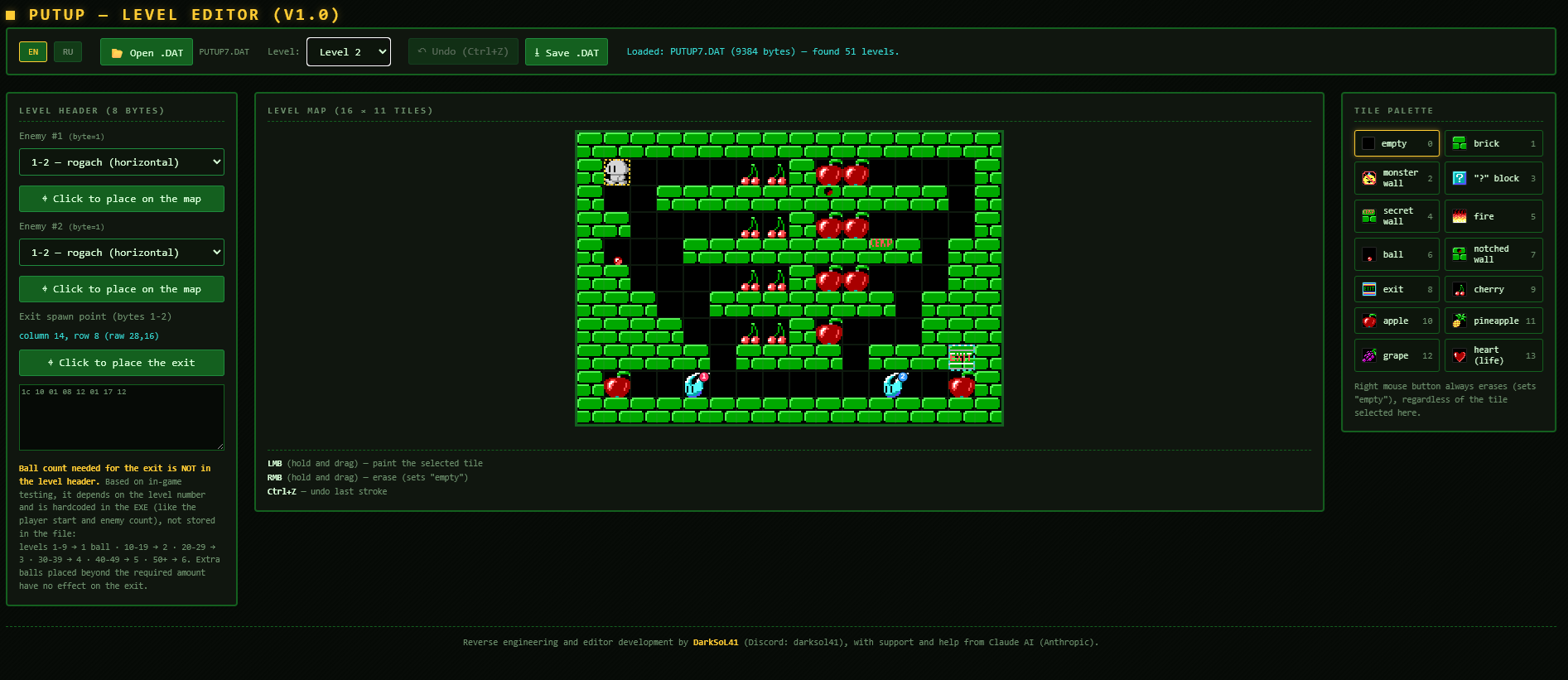
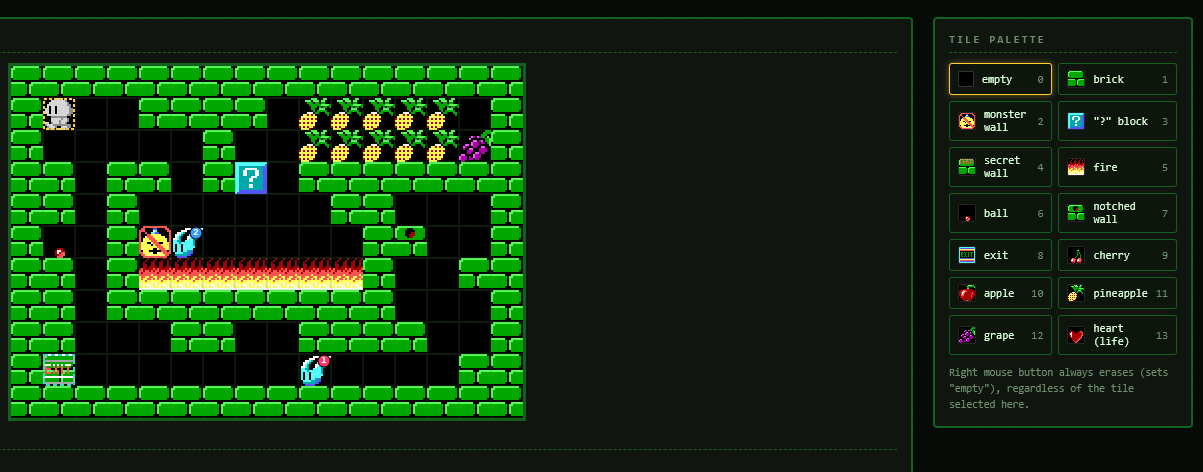
- View and paint the 16×11 tile map for any of the ~51 level slots in the file, using the game's real tile graphics (bricks, "?" blocks, fire, fruit, the secret wall, the ball, the notched wall, the exit, etc.).
- Place the two enemies and choose their type (rogach/horizontal, hat/vertical, or smiley/flying) — shown on the map with their real sprites.
- Place the exit's spawn point — shown as a semi-transparent marker (its black background is rendered transparent, so it stays readable even sitting on top of a brick), since the exit only appears once the required number of balls has been delivered.
- See the fixed player start position (row 1, column 1 on every level — this is hardcoded in the game and not stored in the file, so it's shown as a reference marker rather than something you can move).
- Undo any change with Ctrl+Z (up to 50 steps).
- Save your edited copy as a new
.DATfile you can drop back into the game folder. - Switch the whole interface between English and Russian at any time (top-left corner). English is the default.
Getting started
- Open
putup_level_editor.htmlin your browser (double-click it, or drag it into a browser window — no server needed). - Click Open .DAT and select your copy of
PUTUP7.DATfrom the game folder. - Pick a level from the Level dropdown.
- Start editing (see Controls below).
- When you're done, click Save .DAT. This downloads
PUTUP7_edited.DAT— copy it over the originalPUTUP7.DATin the game folder (make a backup of the original first!) to play your edited levels.
Controls
On the map: | Action | Effect | |---|---| | Left mouse button (hold + drag) | Paint the currently selected tile | | Right mouse button (hold + drag) | Erase (sets the tile to "empty"), regardless of what's selected | | Ctrl+Z | Undo the last stroke or placement |
Tile palette (right panel): click any tile to select it as the active paint tile. The currently selected tile is highlighted.
Placing enemies or the exit: click the corresponding "Click to place on the map" / "Click to place the exit" button, then click anywhere on the map. While armed, a dashed square follows your cursor showing exactly where the object will land; the position snaps to a 16×16 half-tile grid (matching the precision the game itself uses), while the highlighted square always shows the full 32×32 footprint of the sprite that will be placed.
Understanding what you're editing
Each level record in PUTUP7.DAT is 184 bytes: an 8-byte header followed
by a 176-byte tile map (16 columns × 11 rows). The header encodes:
- Bytes 0–1: the exit's spawn coordinates
- Byte 2: enemy #1's type
- Bytes 3–4: enemy #1's X, Y
- Byte 5: enemy #2's type
- Bytes 6–7: enemy #2's X, Y
Three things are not in the file at all, because the game hardcodes them: the player always starts at row 1 / column 1, there are always exactly 2 enemies, and the number of balls required before the exit appears depends only on the level number (1 ball for levels 1–9, 2 for 10–19, 3 for 20–29, 4 for 30–39, 5 for 40–49, 6 for level 50 and above). The editor's header panel notes this directly so it isn't mistaken for something the editor forgot to expose.
Limitations
- The editor edits
PUTUP7.DAT(level layouts) only. It does not touch the game's sound, font, or the still-unsolved 32×32 background-tile graphic files (PUTUP10.DAT/PUTUP11.DAT) — none of which are needed to design a playable level, since every tile placeable on a map is drawn from the already-decoded sprite set. - A handful of raw tile values that occasionally show up in real level data (50, 51, 52, 54, 234) were checked in-game and render as nothing — they are not available as paintable tiles since they have no visible effect.
- Balls beyond the number required for a given level have no additional effect — the exit appears as soon as the requirement is met, not later.
Credits
Reverse engineering and editor development by DarkSoL41 (Discord: darksol41), with support and help from Claude AI (Anthropic).
Legal
This is an unofficial, free, non-commercial fan tool. It is not affiliated with or endorsed by the authors or publishers of Putup. The game, its name, graphics and levels belong to their respective owners.
What is in this package. The game itself is not included: you need your own
copy of PUTUP7.DAT. The only material from the game inside the editor is a small
set of sprites (tiles, enemies, the exit, the player) embedded in the HTML file and
used solely to draw the map.
No warranty of any kind. Keep a backup of your original game files.
If you are a rights holder and want something changed or removed, contact me on Discord (darksol41) and I will do it.
Download
Leave a comment
Log in with itch.io to leave a comment.